Headless front-end preview in Page Builder
The Page Builder can preview pages hosted outside the DXP.
You provide a single URL for the front-end page and let it communicate with the Page Builder using the JavaScript message API.
The usage of this front-end page instead of the DXP one is set per content type. TODO: This is on-prem only, SaaS don't have the choice
Configuration TODO: How this is declared on Saas?
First, set up the feature, for example, in config/packages/ibexa_page_builder.yaml:
1 2 3 4 5 6 7 | |
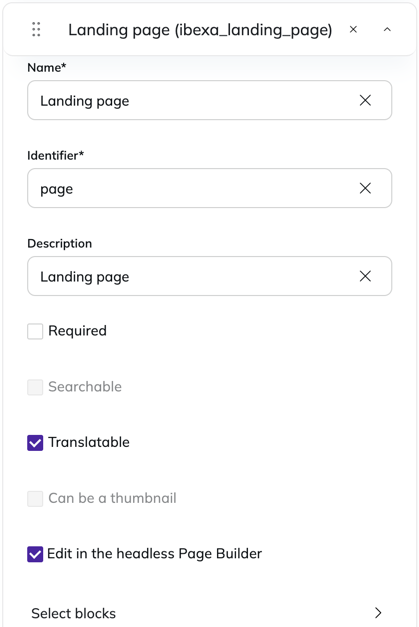
Then, edit the content types with Landing page field type that are used headless, edit that field, and check the option "Edit in the headless Page Builder".
Communication protocol
The front-end resource targeted by base_url is loaded by the Page Builder when editing a content having a Landing page field "Edit in the headless Page Builder" enabled.
This resource must follow a protocol to communicate with the Page Builder from the iframe is loaded in.
This protocol is based on the JavaScript message API.
The Page Builder sends messages to the framed front-end resource. They can be received by listening the message event.
The front-end resource sends back messages to the Page Builder.
They can be sent using the postMessage() method.
The target origin of those messages must be the Page Builder's origin.
1 2 | |
Those messages are JS objects with the following structure:
1 2 3 4 | |
The PREFIX sort message types by their sender.
PB: for messages sent by the Page Builder, APP: for messages sent by the front-end resource.
The data depends on the message type.
Message types are then sorted by capabilities. So the front-end can declare which capabilities it supports and the Page Builder can refrain from sending or expecting unsupported messages.
Message types and capabilities
The handshake and core messages are mandatory and not related to an optional capability.
| Capability | Message type | Description |
|---|---|---|
| (handshake) | APP:INITIALIZED |
Establish protocol and capabilities. |
| (handshake) | PB:INIT_MODE |
Confirm protocol and draft info. |
| (core) | PB:UPDATE_FIELD_DATA |
Send updated field data. |
| (core) | PB:DISPATCH_EVENT |
Re-dispatch a front-end event. |
blocks.dnd |
PB:DRAG_START_PREVIEW |
Existing block drag started. |
blocks.dnd |
PB:DRAG_OVER |
Mouse position during drag. |
blocks.dnd |
PB:DRAG_END_PREVIEW |
Existing block drag ended. |
blocks.dnd |
PB:DROP |
Drop notification. |
blocks.dnd |
APP:DROP_RESPONSE |
Report where the block was dropped. |
blocks.dnd |
PB:SCROLL_BY |
Scroll the preview. |
blocks.geometry |
APP:POSITIONS_UPDATE |
Report block positions. |
blocks.geometry |
APP:SCROLL_END |
Scroll ended. |
blocks.remove |
PB:BLOCK_REMOVE |
Remove a block. |
blocks.remove |
APP:BLOCK_REMOVE_RESPONSE |
Confirm removal. |
blocks.remove |
APP:BLOCK_REMOVE_REQUEST |
Request block removal. |
blocks.reveal |
PB:SCROLL_INTO_BLOCK |
Scroll a block into view. |
blocks.select |
APP:BLOCK_CLICKED |
TODO: Block clicked. |
pointer.tracking |
APP:MOUSE_POSITION |
Report mouse position. |
preview.params |
PB:UPDATE_PREVIEW_PARAMS |
TODO: Update preview params. |
Communication initialization
First, the front-end send an initialization message to the Page Builder, indicating which version of the protocol and which capabilities are supported:
1 2 3 4 5 6 7 8 9 10 11 12 13 14 15 | |
The Page Builder replies with a confirmation message. The initialization message might be sent several times until the Page Builder replies to it.
This confirmation data contains:
- the actual version of the protocol used (
protocol.version) and the other supported versions (protocol.supported) - a list of all available capabilities (
capabilities) - a list of the existing block types, their attributes, and their configuration (
blocksConfig) - information about the actually edited content draft (
intentParameters) - the current value of the Landing page field being edited (
fieldValue) including the layout, zones, and blocks. - a block-ID-to-name mapping (
blocksIdMap) - a list of translations for the front-end to use (
translations)
1 2 3 4 5 6 7 8 9 10 11 12 13 14 15 16 17 18 19 20 21 22 23 24 25 26 27 28 29 30 31 32 33 34 35 36 37 38 39 40 41 42 43 44 45 46 47 48 49 50 51 52 53 54 55 56 57 58 59 60 61 62 63 64 65 66 67 68 69 70 71 72 73 74 75 76 77 78 79 80 81 82 83 84 85 86 87 88 89 90 91 92 93 94 95 | |
On field update
The PB:UPDATE_FIELD_DATA message is sent from the Page Builder to the front-end resource when the Landing page field value is updated.
Its data contains the new value of the field with the following structure:
- a list of the existing block types, their attributes, and their configuration (
blocksConfig) - the current value of the Landing page field being edited (
fieldValue) including the layout, zones, and blocks. - a block-ID-to-name mapping (
blocksIdMap) - a list of Ids from the new blocks that have been added (
highlightedBlockIds)
1 2 3 4 5 6 7 8 9 10 11 12 | |
Re-dispatching events
The PB:DISPATCH_EVENT message is sent from the Page Builder to the front-end resource for being re-dispatched there as a custom event.
1 2 3 4 5 6 7 | |
TODO: Available events
ibexa-active-block-clicked?ibexa-post-update-blocks-preview?
Geometry and pointer tracking (blocks.geometry and pointer.tracking)
The pointer tracking and the geometry helps the Page Builder to position the block editing menus above the front-end preview.
Such menu is a .c-pb-headless-preview-menu element positioned by the Page Builder from its DOM above the preview iframe.
APP:MOUSE_POSITION message is sent from the front-end preview to the Page Builder to declare the actual position of the mouse.
1 2 3 4 5 6 7 8 9 | |
APP:POSITIONS_UPDATE message is sent from the front-end preview to the Page Builder to declare the actual position of the blocks.
Its data contains a list of objects with block IDs, their positions, and dimensions in the front-end preview.
This format is close to getBoundingClientRect() method.
1 2 3 4 5 6 7 8 9 10 11 12 13 14 15 16 17 18 19 20 21 22 | |
This message should be sent each time the positions of the blocks change.
It should be sent after updating the blocks, like in response to PB:UPDATE_FIELD_DATA.
It should be sent after scrolling or resizing.
APP:SCROLL_END message is sent from the front-end preview to the Page Builder to notify that a scroll operation has ended.
It has no data.
1 2 3 4 5 6 7 8 9 10 11 12 13 14 15 16 17 | |
TODO: Is there other events that should trigger a positions update?
Drag and drop (blocks.dnd)
PB:DRAG_OVER message is sent from the Page Builder to the front-end preview to give the position of the mouse while a (new or existing) block is dragged.
Tip
APP:MOUSE_POSITIONhelps the Page Builder to know where the mouse is when moved over the preview.PB:DRAG_OVERhelps the front-end to know where the mouse is when a block is dragged over the preview.
PB:DRAG_START_PREVIEW and PB:DRAG_END_PREVIEW are sent at the beginning and at the end of a drag operation on an existing block in the front-end preview.
Its data contains the ID of the block being dragged (blockId).
PB:DROP message is sent from the Page Builder to the front-end preview to notify that a block has been dropped.
It has no data. Combined with the last PB:DRAG_OVER message, the front-end can determine where the block has been dropped.
APP:DROP_RESPONSE message is sent from the front-end preview to the Page Builder to tell where the block has been dropped.
Its data contains:
- the ID of the zone where the block has been dropped (
zoneId) - the ID of a block that is now below the dropped block (
nextBlockId) if the dropped block isn't the last one of the zone.
In the following example, targetBlockId value is the ID of a block the dropped block was dropped on or just before, so the dragged block takes its place and move it below, or null when dropped at the bottom of the zone.
1 2 3 4 5 6 7 | |
PB:SCROLL_BY message is sent from the Page Builder when a block is dragged near a border of the preview which needs to be scrolled.
Its data contains the top or left amount to scroll by.
1 2 3 4 5 6 7 | |
See Geometry (blocks.geometry)'s APP:SCROLL_END message to declare the end of the scroll operation
and APP:POSITIONS_UPDATE message to update the blocks positions.
Block reveal (blocks.reveal)
PB:SCROLL_INTO_BLOCK is send by the Page Builder to the front-end preview to request that a block is scrolled into view.
Its data contains the ID of the block to scroll into view (blockId).
It can be used with the scrollIntoView() method.
1 2 3 4 5 6 7 8 | |
Block removal (blocks.remove)
PB:BLOCK_REMOVE message is sent from the Page Builder to the front-end preview to notify that a block should be removed, for example, from the Structure view.
Its data contains the ID of the block to remove (blockId).
APP:BLOCK_REMOVE_RESPONSE message is sent from the front-end preview to the Page Builder to confirm that the block has been removed as requested by PB:BLOCK_REMOVE.
Its data contains the ID of the removed block (blockId).
It can be sent immediately or after removal animation.
APP:BLOCK_REMOVE_REQUEST message is sent from the front-end preview to the Page Builder to request the removal of a block.
Its data contains the ID of the block to remove (blockId).
The Page Builder responses with a PB:UPDATE_FIELD_DATA.